Use Shopify as the source of truth
Select active discount codes that already exist in Shopify. The app helps shoppers discover them without creating a second discount system.

MW Coupon List Lite turns selected Shopify discounts into a branded coupon popup in the cart or cart drawer. Shoppers see offers that fit their cart and apply compatible codes in one click—without hunting through banners, emails or theme code.
Bring public offers into the buying journey without replacing Shopify’s discount rules or turning the storefront into a wall of promotions.
Select active discount codes that already exist in Shopify. The app helps shoppers discover them without creating a second discount system.
Use optional eligibility checks to keep the offer list focused on discounts that match the shopper’s current cart.
Give shoppers a clear offer list and a direct way to apply compatible coupons while they are already close to checkout.
Customize the button, popup text, colors, fonts and offer order so discount discovery feels like part of the store.
Coupon List Lite gives shoppers one focused place to compare selected offers, understand the promotion and apply a compatible code without leaving the cart experience.
Explore the product guide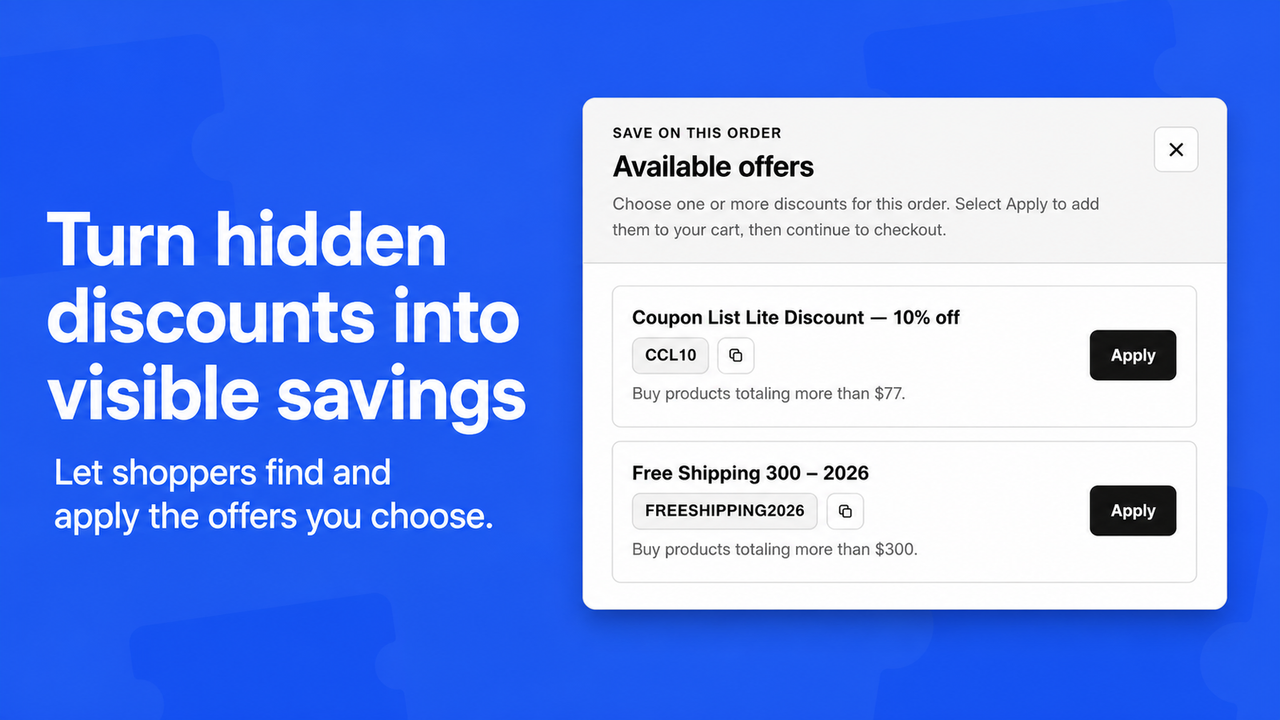
Three straightforward steps from an active Shopify discount to a visible cart offer.
Select up to 10 existing Shopify discount codes that you want shoppers to discover in the cart.
Write public titles and short explanations, set the order and choose a cart page or cart drawer placement.
Enable Coupon List Lite in the Shopify theme editor. No theme code surgery is required.
Discount discovery works best when the offer is clear, relevant to the cart and easy to apply. Coupon List Lite keeps the promotion setup in Shopify and puts the customer-facing offer closer to purchase intent.
A Shopify coupon popup is a storefront offer list that helps shoppers discover and apply discount codes while they are viewing the cart. Coupon List Lite displays selected active Shopify discounts in the cart page or cart drawer, with customer-facing titles and short explanations.
No. Shopify remains the source of truth for discount dates, minimums, customer rules, usage limits and combinations. Coupon List Lite only presents the offers you select and can hide an offer when optional cart eligibility checks show that it does not fit.
A code can be active but still hard to find if it lives in an old email, a social post or a banner that a shopper has already missed. A focused cart popup puts the public offer near the decision, without requiring a custom theme-code change.
View MW Coupon List Lite in the Shopify App Store or read the product guide.
Clear answers before you publish your first offer list.
No. You create and manage discounts in Shopify, then choose which active codes Coupon List Lite should show to shoppers. Shopify remains the source of truth for dates, rules, limits and combinations.
You can place the offer button on the Shopify cart page, inside the cart drawer or in both locations through the theme app embed.
No theme coding is required. Install the app, configure your selected offers and enable the Coupon List Lite app embed in the Shopify theme editor.
The Full Access plan lets you select and publish up to 10 active Shopify discount codes. Shoppers see the offers you choose, in the order you set.
Every Coupon List Lite feature is included in one simple plan.
or $29.99 billed yearly — save 16%
Prices are shown in USD. Check the Shopify App Store for current billing and trial details.
Install MW Coupon List Lite and make the right Shopify discount easier to see, understand and use before checkout.